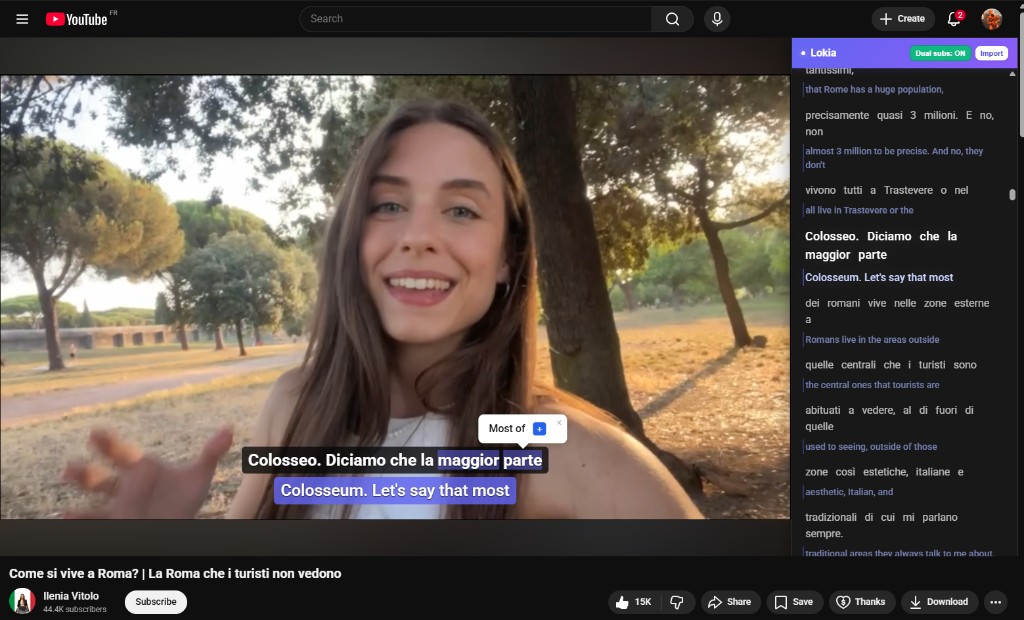
Use the browser extension on YouTube
On YouTube videos with subtitles, click any subtitle word to translate it instantly and save it to your account in one flow.
How it works
Lokia combines a browser extension and the web app to help you capture vocabulary from videos and retain it over time.
On YouTube videos with subtitles, click any subtitle word to translate it instantly and save it to your account in one flow.

Discover gives you ready-to-learn videos, and imported videos appear in your account too. This is where you choose what to study next.

Inside the Lokia player, subtitle words are color-coded by your knowledge level, so you instantly see what is known and what still needs practice.

Words added from videos (or other sources) can be reviewed with FSRS flashcards to maximize retention over time.

Before starting a session, you can see useful FSRS tracking stats (counts, due cards, and progress indicators) to monitor your learning.

You can also review vocabulary directly in word lists, filter by level, and assign your own knowledge level to each word.

After your reviews, you can train the same vocabulary with mini-games to strengthen recall in a faster and more playful way.
Create your account and start learning from videos you already watch.