Dual subtitles
Watch YouTube and Netflix in two languages at once. Follow the original audio and a clear translation on screen, without pausing the video.
What are dual subtitles?
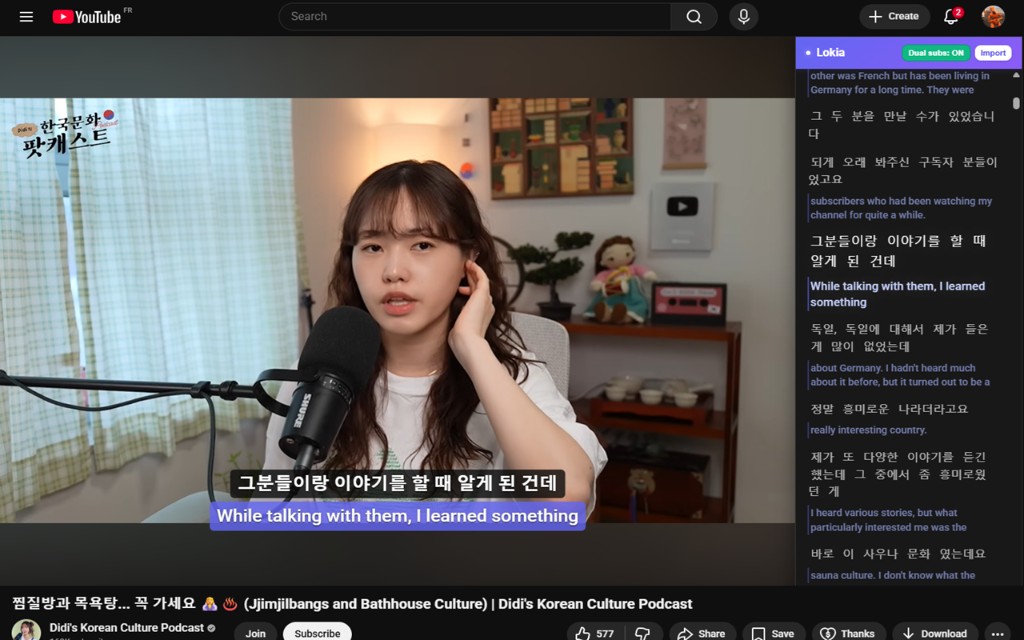
Dual subtitles display two tracks at the same time: the language spoken in the video and a translation in the language you understand. Instead of switching subtitles on and off, you see both lines together while you watch.
This makes authentic content easier to follow. You catch pronunciation and natural phrasing in the original, while the translation fills in what you miss.
How dual subtitles work on Lokia
Lokia is a browser extension for Chrome, Firefox, and Edge. On YouTube and Netflix videos with captions, you can enable dual subtitles from the Lokia panel. The original subtitles stay on the player while a second line shows the translation.
On YouTube, the same dual subtitle view also appears in the transcript panel, so you can scroll, search, and work through the dialogue at your own pace.
Key features
Two lines on screen
The original language on the first line and the translation on the line below, on the video player and in the YouTube transcript.
Instant word lookup
Click any word in the subtitles to get a translation in context. No need to leave the player.
Custom wordlists
Save words and phrases to your own lists. Organize vocabulary by topic, video, or goal.
Review with flashcards
Words you save sync to your Lokia account and feed into FSRS flashcard reviews.
Build vocabulary with custom wordlists
When you find a useful word or phrase while watching, add it to a wordlist with one click. Lokia keeps the subtitle context so you remember where the word came from.
Create multiple lists for different languages or topics. Search, edit, and study them with flashcards and mini-games in the Lokia web app.
Get started in minutes
- 1
Install the extension
Download Lokia for Chrome, Firefox, or Edge from our download page.
- 2
Open a YouTube or Netflix video
Pick a video that has captions in your target language.
- 3
Enable dual subtitles
Open the Lokia panel and turn on dual subtitles. Click words to translate and save them.
Frequently Asked Questions
Try dual subtitles on YouTube and Netflix
Install the free Lokia extension and start learning from the videos you already watch.