Download Lokia Extension
Download the Lokia browser extension for Chrome, Firefox, and Edge. Learn languages on YouTube and Netflix with dual subtitles, instant translations, and vocabulary building.
Chrome
Get Lokia for Chrome Web Store
Firefox
Get Lokia for Firefox Add-ons
Edge
Get Lokia for Microsoft Edge
What You'll Get
Lokia transforms YouTube and Netflix into powerful language learning tools
Dual Subtitles
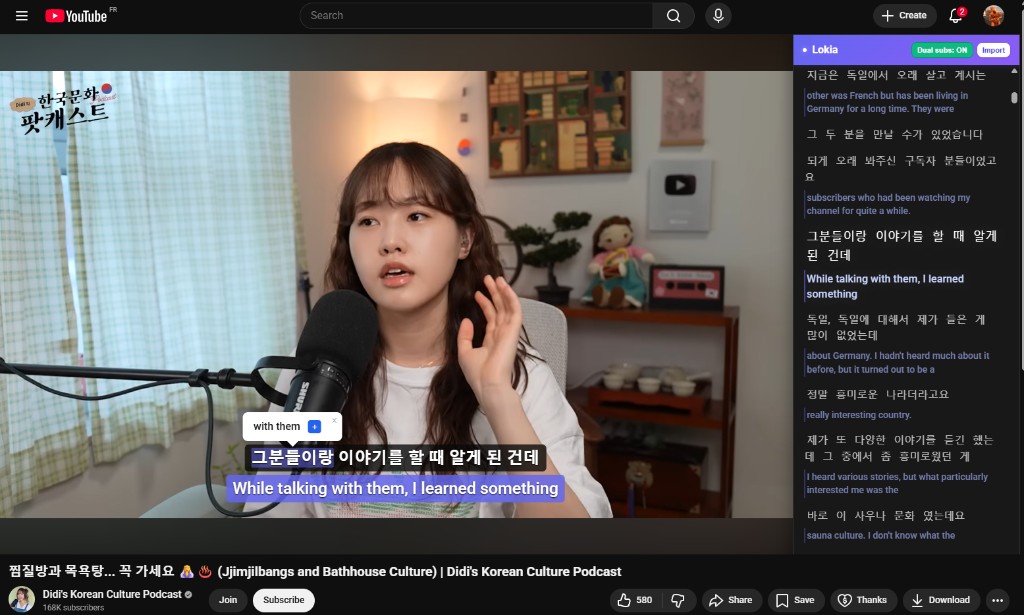
Enable dual subtitles on YouTube and Netflix videos with captions: original language and translation displayed together, plus interactive word lookup.
Instant Translation
Hover over words for immediate translations in over 50 languages
Save & Review
Build your personal vocabulary and review with spaced repetition
Context Learning
Learn words in real context from authentic content
See It in Action
Dual Subtitles
Toggle dual subtitles to display the original language and translation at the same time on the video and in the transcript panel
Interactive Subtitles
Enable subtitles on the video, then click a word for an instant translation
Save to Wordlist
Build your vocabulary by saving interesting words
Sync Across Devices
Your vocabulary syncs with your Lokia account automatically
Import to Your Account
Import YouTube videos with subtitles to study them later in your Lokia account
How to Install
Get started in less than 2 minutes
Choose Your Browser
Click on your preferred browser above to visit the extension store
Install Extension
Click "Add to Browser" and confirm the installation when prompted
Start Learning
Open a YouTube or Netflix video with subtitles, click words to translate them, and save vocabulary to your Lokia account
Frequently Asked Questions
What does the Lokia extension do?
Lokia helps you learn languages on YouTube and Netflix. Watch videos with dual subtitles, click any subtitle word for an instant translation, save words to your vocabulary, and review them on lokia-app.com.
Is the Lokia extension free?
Yes. Dual subtitles, word translation, and vocabulary saving work for free, with no account required. Premium unlocks video import, unlimited wordlists, and other advanced features.
How do I get started?
Install Lokia from the Chrome Web Store, Firefox Add-ons, or Edge store. Open a YouTube or Netflix video with subtitles, open the Lokia panel, and start translating and saving words.
Which browsers are supported?
Lokia is available for Chrome, Firefox, and Microsoft Edge.