Master Languages ThroughReal Content
Master languages through real content you love: turn YouTube and Netflix videos into powerful learning experiences and build vocabulary naturally with intelligent spaced repetition.
Learn from over 50 languages including:
Loading languages…
Learn Languages the Natural Way
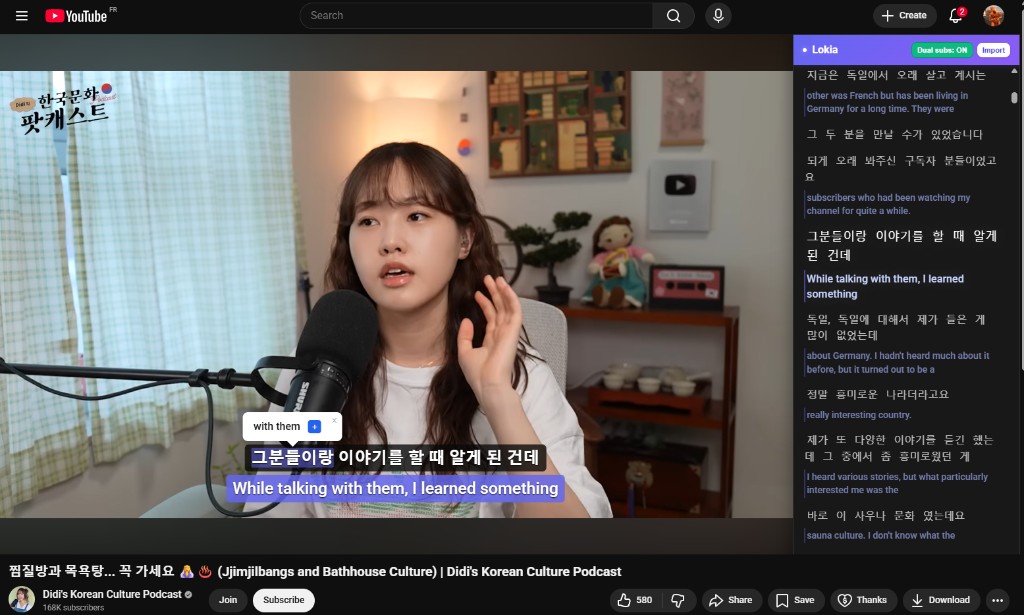
Watch videos you love, enable dual subtitles to see the original and translation together, click on any word for instant lookup, and build your vocabulary effortlessly. Lokia transforms your screen time into learning time.
- Dual subtitles: original language and translation displayed together
- Click any subtitle word for instant translation
- Review vocabulary with smart flashcards
- Works on desktop and mobile, light and dark mode


Powerful Features
Learn Through Context
Watch videos you love while learning. Our extension provides instant translations and helps you discover new words naturally.
Smart Spaced Repetition
Master vocabulary with the FSRS algorithm. Review words at optimal intervals for long-term retention.
Custom Wordlists
Create personalized vocabulary collections. Search, translate, and organize words that matter to you.
Context-Rich Learning
See words in multiple contexts with example sentences. Understand usage patterns and nuances.
Browser Extension
Transform YouTube and Netflix videos into learning opportunities with dual subtitles and clickable translations.
Progress Tracking
Monitor your learning journey with detailed statistics and progress indicators for each word.
Lokia Extension
Dual Subtitles
Enable dual subtitles to see the original language and translation at the same time on the video and in the transcript panel.
Interactive Subtitles
Click any word or phrase in the subtitles to get instant translations and save it to your vocabulary.
Save to Wordlist
Add discovered words directly to your personal wordlists for later review.
Smart Progress Tracking
See your knowledge level for each word displayed right in the extension.
FSRS Algorithm
Powered Learning
Our spaced repetition system uses FSRS (Free Spaced Repetition Scheduler). Scientifically optimized intervals ensure you review words at the perfect moment for long-term retention.
- Adaptive scheduling based on your performance
- Long-term memory optimization
- Efficient study sessions